

The World Cup buzz is officially bleeding into everyone's Instagram feed, and I am here for it. Between that and the fact that half of my for you page this week was people revealing pixelated images one square at a time, it is safe to say Instagram has a type right now. People want to tap, swipe, and wait for the reveal.
So that is exactly what this Trend Drop leans into. You have got the aesthetic nine square carousel that everyone cannot stop swiping through, the pixelated reveal trend but now in reel form with its own little sound effect, a red card post that is about to feel extremely relevant, and the van meme that makes everyone tag their bestie without fail.
Four trends, four templates, all done for you. Let's get into it.
Want to try a FREE Trending Canva template?
Grab the latest Canva Template from inside of Your Template Club “Trend Drops” so you can test out one or two of out these timely, viral, trend templates for your business!
Trend One: The 9 Squares Reveal Carousel
This is the interactive carousel everyone is obsessed with this week, and I get why. As people scroll through your carousel, your image and your message literally build square by square right in front of them. It is the kind of format that makes people keep tapping just to see the full picture, which is exactly the point.
I posted mine the day it dropped and it is already trending up, even though I posted it right over the 4th of July holiday when engagement is usually pretty quiet. That is how you know a trend has real legs.
Here is the one thing to know before you dive in. Your message needs to land in nine words. That is genuinely the only tricky part, and honestly it is the perfect excuse to use AI the right way. If you already know what you want to say but cannot quite squeeze it into nine words, ask your AI of choice to take your idea and give you a list of nine word versions. You pick the one that sounds like you. That is using AI to sharpen your own thought, not to think for you, and it works so well here.

Once your words are set, you can change up the fonts to match your brand. Just keep your text away from the edges of the slide. Instagram crops the feed view slightly, so anything too close to the border can get cut off. If you want to add your handle, drop it small in the corner so it is there without competing with your message.
This one takes minutes to customize and it is easily the most satisfying trend in the pack this week. If you only post one thing from this Trend Drop, I would start here.
Trend Two: The Click to Reveal Reel
If you have been here before, you already know I taught the pixelated reveal trend as a carousel a couple of weeks ago. This week it showed up again, but as a reel, and honestly it might be even more fun in motion.
Here is how it works. An animated hand clicks on a blurry, pixelated image labeled with a little file size, and the second it clicks, the image sharpens and reveals whatever your audience needs. I even built in a sound effect right at the moment of the click, and it is so satisfying.
One important thing before you customize. The sound effect lives on the whole project, not on one single page, so if you copy the page to make your own version, the sound effect will not travel with it. The easiest move is to download the original file as is, with the sound effect already attached, instead of duplicating the page.

To make it yours, you only need to touch two images. Start with the non pixelated version of whatever you are revealing. It could be a screenshot of your program, a photo of your product, or a little logo. Position it in your layers so it sits under the hand but above the shadow, and that page is done.
For the second page, copy that same image, place it again, and keep it under the little file size icon and the hand, but above the shadow. Then go to edit, then apps, and search for the app called Pixelify. Select it, set the scale to three, and click replace. That gives you the blurry, unrecognizable version for the first page of the reveal.
When you are ready to post, download both pages together. They come out as one reel, sound effect included, and the reveal plays exactly like mine did. It looks much more complicated typed out than it actually is once you are inside Canva clicking through it.
Trend Three: The Red Card
With the World Cup buzz building, the red card is having a moment, and it is the perfect way to call out a habit or belief in your niche that needs to be benched for good.
Think about the one thing your audience keeps doing that is not serving them. Maybe it is a bad habit, an outdated belief, or something toxic that keeps showing up in your industry. The red card format gives you permission to call it out directly, and your audience will feel very seen.

There are two versions built into this template, so pick whichever fits your brand better. You can also delete the background entirely and swap in your own brand color if that feels more on brand for you. My pro tip here is do not stop at one. Create a few red card statements and turn the whole thing into a carousel. It gives your audience more to relate to and keeps them swiping through your whole post instead of just one slide.
Trend Four: How to Kidnap Me
This one is just funny, plain and simple, and it is the kind of post people send straight to a friend without thinking twice. The format is a van labeled how to kidnap me, filled with all the things your audience literally cannot resist.
I filled mine with little grouped elements so you can easily delete whatever does not apply to you and drop in whatever does. Everything is grouped so it stays easy to swap without messing up the layout underneath it.

The only design tip here is about placement. When you drop something into the corner of the van, size it down a little so it looks like it is tucked behind the door instead of floating on top of it. It does not need to be perfect. It just needs to read like it belongs there.
I also built a second version of this template for anyone with a digital product or program to promote. Instead of the van full of little icons, you get a laptop mockup where you can drop in a screenshot of your program, your course, or whatever you are selling. Just make sure your screenshot is sized big enough that people can actually read it when they zoom in, and you are ready to post.
Why These Four Trends Work Together
Every one of these trends gets your audience to do something more than just scroll past. That is really the whole point of a good Trend Drop.
The nine square carousel keeps people tapping because they cannot stop until they see the full reveal.
The click to reveal reel gives that same satisfying payoff, but in a format that plays automatically instead of needing a swipe.
The red card gets your audience nodding along and tagging a friend who needs to hear it.
And the kidnap van is just pure fun, the kind of post that gets sent around because it feels so specifically true.
None of these need you on camera. No hair, no makeup, no filming and reshooting until you get it right. You are taking a format that is already proven to work and filling it in with something true to your business. That is the entire idea behind Trend Drops. We watch what is taking off, build the template while it is still fresh, and get it to you so you can post early instead of catching a trend after everyone else already has.
If you are already inside Your Template Club, log in and grab this pack. If you have been thinking about joining, this week is a great time to see exactly what you get with every Trend Drop.
Trending Templates Released as Instagram Trends Emerge
When you join Your Template Club, you get access to Trend Drops — short, timely template packs inspired by the latest viral Instagram trends, so you can jump on trends early without spending hours figuring it out. We do the research, design, and strategy for you.
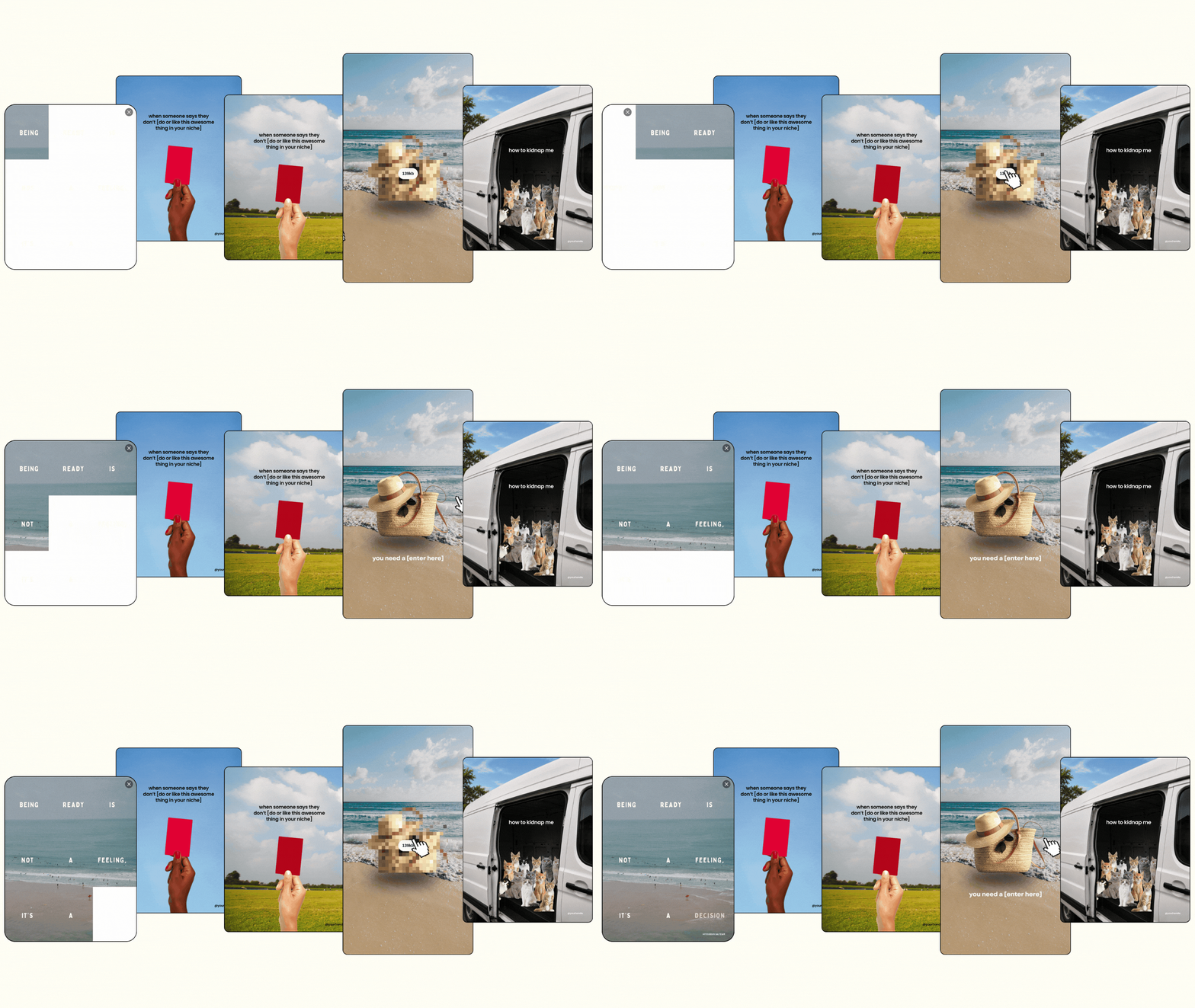

Photo: KVC Photography
About Manu Muraro
Manu Muraro is the founder of Your Social Team, a content marketing brand helping small business owners grow through strategic email marketing and Instagram content.
She’s the creator of Your Template Club, one of the first Canva template subscriptions designed for Instagram, and the founder of Your Inbox Team, a weekly email marketing membership that helps entrepreneurs send consistent, high-converting emails in under 15 minutes.
Manu is also the creator of The Reelies Awards, the first award show celebrating Small Business Owners and Creators’ creativity and originality in Instagram Reels.
A former creative strategist at Cartoon Network, Manu brings award-winning experience to everything she creates — from viral Reels to done-for-you content that saves time and drives results.
👉 Follow Manu at Your Social Team on Instagram