
5 Carousel and Meme Trends That Are Working Right Now (Trends for September: Week 4)
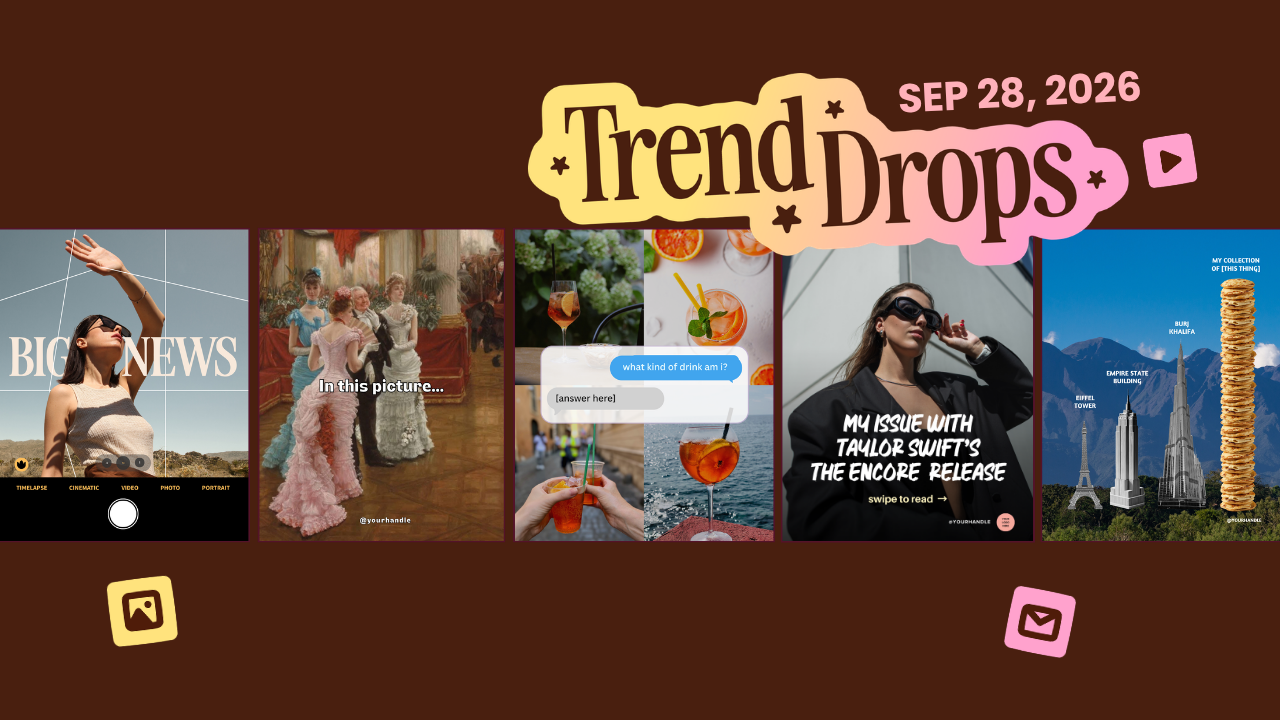
Every time Taylor Swift drops new music, the internet does the same thing. Everybody suddenly has an opinion, and everybody wants to share it. My feed fills up with hot takes, breakdowns, and people very loudly explaining their feelings about a song they heard eleven minutes ago.
And that's exactly where one of this week's trends came from. But when I started building this pack, I noticed something about all five trends. None of them are really about the thing they look like they're about. One looks like drama and turns into a sales post. One looks like a person stepping out of your phone. One looks like a quiz. One looks like a fancy old painting and ends with your offer. One looks like a list of skyscrapers and ends with a pile of coffee cups.
Every trend this week is a little game. It makes a promise on the first slide, then pays it off with a twist, and that twist is what keeps people swiping, commenting, and sending your post to a friend. That's the stuff Instagram notices.
So let's go through all five, why each one works, and how to make it yours in Canva without losing your whole afternoon. And stick around for the end, because I'll tell you which one I'd post first.
Want to try a FREE Trending Canva template?
Grab the latest Canva Template from inside of Your Template Club “Trend Drops” so you can test out one or two of out these timely, viral, trend templates for your business!
Trend One: “My Issue With” Carousel
Let's start with the one that came straight out of the Taylor Swift chaos.
The "My Issue With" Carousel opens with a cover slide that says you have an issue with something everyone is talking about. Right now, that's the new music. Then your audience swipes, and the next slide says, just kidding, you don't have an issue with it at all. The only issue you have is that they're still struggling with whatever thing you help them fix. From there you either sell your solution or give them a quick tip, and you end with your call to action.
Why does this work so well? Because people love an opinion. When the internet is in a "who said what about this release" mood, a cover that hints at a spicy take gets the swipe almost automatically. Curiosity does all the heavy lifting. And once they've swiped, they're already reading your post. They land on a sales message they actually enjoyed, because it made them laugh first.
This is a be salesy post in a fun costume, and I mean that as a compliment. Selling is not something to hide. This trend just makes it feel easy.
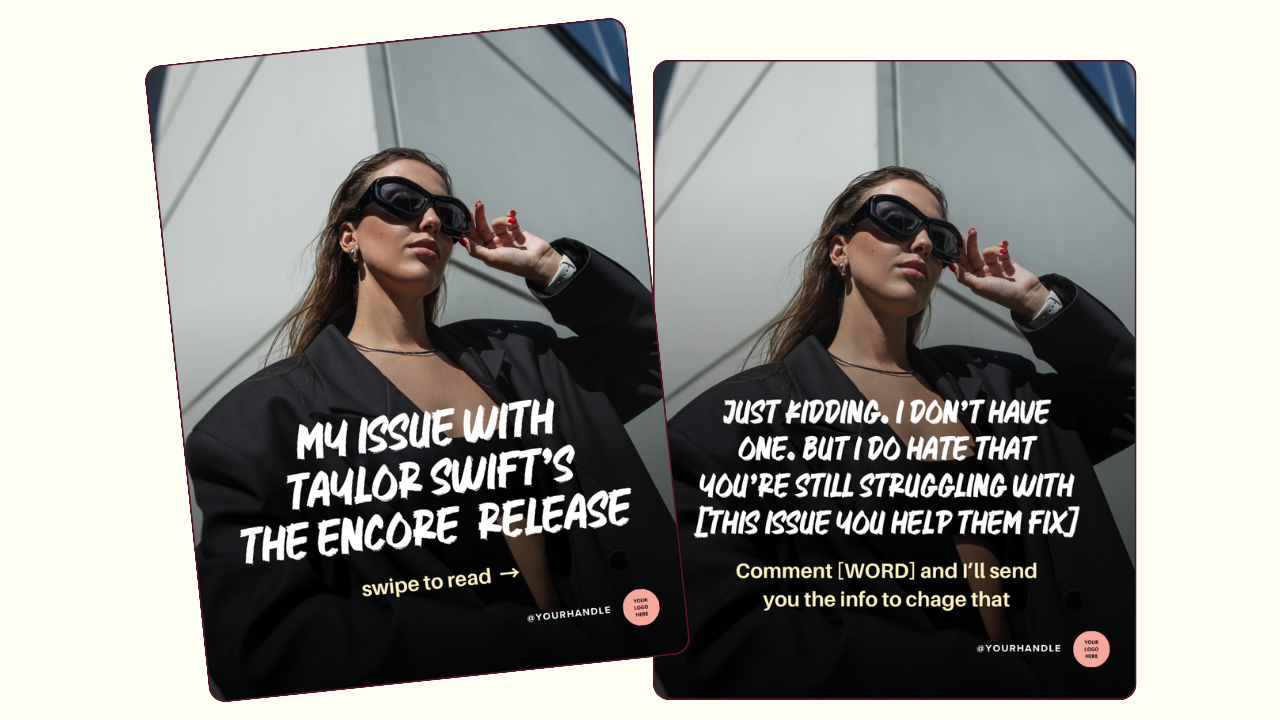
Customizing it takes one important trick. The template has a gradient overlay that keeps your text readable on top of a photo. When you drag your own photo in, drop it at the very top of the design, above the overlay, so it lands in the background. If you drop it lower, it can land on top of the gradient, and then your text is fighting your photo. Get the photo in the background, and you're set.
After that, change the colors to match your brand. The font in the template is bold and works for almost everyone, because bold text reads well on Instagram. If you'd rather use your own brand font, go for it. Swap in the struggle your audience has, add your fix, finish with your CTA, and that's your whole carousel.
Trend Two: Camera Grid iOS Core
This next one is all about the visual, and I love it.
Camera Grid iOS Core uses the grid lines you see on your iPhone camera screen. A person sits inside that grid, and the lines are layered so some go behind them and some cross in front of them. The result looks like the person is stepping right out of the camera screen and into your feed.
It works because it breaks the flat look of the feed. We are used to scrolling past flat photos and flat graphics all day. When something looks like it has depth, like it shouldn't be possible on a phone screen, our brains stop to figure it out. That's your scroll stop. It also makes your whole profile look more polished, which means more people tap over to see what else you've posted.

Use it for any big news. A launch, a new service, a sale, a milestone. You can also use it as the cover slide of a carousel, which instantly makes the whole carousel look more designed. I use it that way myself. I duplicated the page, removed the person, and placed pictures of my templates around the grid.
Now, this one looks hard to edit. It is not. When you drag your own photo into the frame, the background remover is already applied, so Canva cuts you out automatically. That one detail saves you a ton of time.
Then you play with the lines. Move one grid line so it sits behind the top of your head, and move another so it crosses in front of you. That mix of behind and in front is what sells the effect. If your photo is sitting on top of a line and you can't grab it, move your photo out of the way, adjust the line, then move your photo back. It can take a minute of nudging, but once it clicks, it looks amazing.
Trend Three: “What Am I “ Carousel
From the most visual trend to the most personal one.
The "What Am I" Carousel asks a series of questions about you. If I were a season, what season am I? If I were a drink, what drink am I? Each slide answers with four photos that represent you, and a short answer. The template comes with questions like season, drink, flower, weather, and food.
This one is basically a personality quiz, and nobody can resist those. As people read your answers, they start answering for themselves in their heads. A lot of them will do it in the comments too, especially if you ask them to. It also lets you show your personality and your brand vibe without writing a long post about yourself, which is the post most business owners avoid making.

To customize it, keep your answers short and sweet. One or two words is perfect. If you do need a longer answer, make the background box behind your text bigger too, so everything still looks clean. Swap the photos for ones that match your brand.
And the questions are yours to change. If you're a florist, you might want more flower questions. If you sell candles, ask what scent you are. Make it fit your business, then end with a prompt asking people to share their answers in the comments.
Trend Four: “She’s Looking At” Carousel
This is the one I'm most excited about this week.
The "She's Looking At" Carousel is our take on a TikTok trend that just started making the rounds. The joke goes like this. The first slide shows a woman in a painting looking at something. The caption says she's looking at the count's nephew, or the hot bachelor, or whoever you want. Then the next slide says what you're looking at, and it's your offer. Your product, your course, your service.
It works because it's funny first and a sales pitch second. Nobody minds being sold to when they're laughing. And since it's still new on TikTok, it hasn't flooded Instagram yet. Posting a trend early is how you get the extra reach before everyone else catches on.
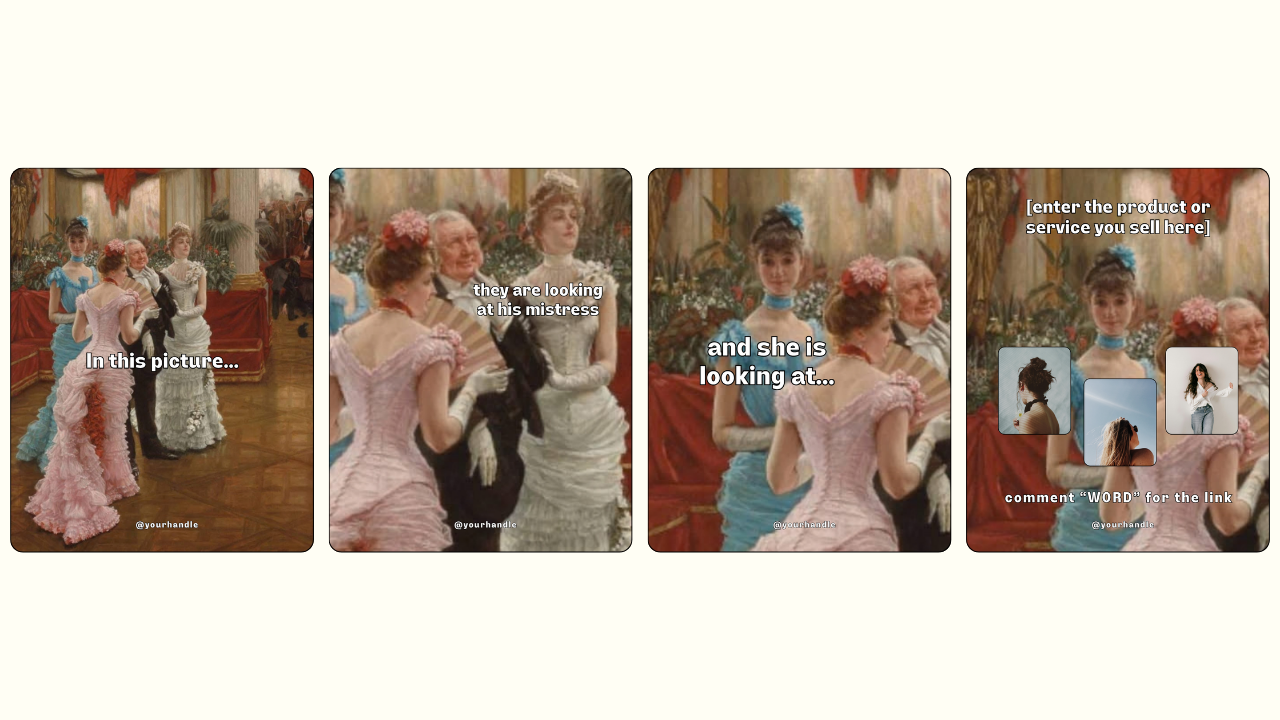
There's one big problem with the original version. It uses a copyrighted photo, and posting copyrighted images can get your content taken down or get you into real trouble. So we made sure to recreate the trend with a classic painting that is old enough to be free to use. You get the laugh without the legal risk. That's why this one is a Your Template Club exclusive.
To make it yours, put your offer on the "you're looking at" slide. You can go full page with just your product, which is how a lot of people are doing it on TikTok. Or keep her in the background and use the little image spots we added, in case you want more visuals. Either way works. Finish with your CTA.
Trend Five: “Tallest of All” Meme
And we end the pack with the weird one. In the best way.
The Tallest Of All Meme takes the famous comparison of the tallest buildings in the world and lines them up. Then, next to them, comes the tallest of all, which is your collection of something. Coffee cups. Necklaces. Courses you bought and never opened.
It's supposed to feel a little strange, and that's why it gets shared. People see their own habits in it and tag their friends who collect the same thing. It's relatable without being a lecture, and it makes your brand feel human.

The trick to customizing it is picking the right collection. Choose something your audience collects and maybe doesn't need, or something you collect that they should too. If you sell jewelry, it's necklaces. If you're a coach, it's unopened courses. My own version stacks up groups of people to show the followers I've gained by posting trends early.
If the busy background isn't your style, switch it to a solid dark color for a cleaner, more minimal look. Both work.
Which Trend Should You Post First
Here's how I'd post these.
Start with the "She's Looking At" Carousel. It's the newest of the bunch and still fresh on TikTok, so posting it early gives you the best shot at reach.
Post the "My Issue With" Carousel next, while the Taylor Swift release is still fresh in everyone's minds. Trends tied to a moment fade fast.
Camera Grid iOS Core, the "What Am I" Carousel, and the Tallest Of All Meme are more timeless. You can hold any of them for a week when you're low on energy or low on ideas. Camera Grid iOS Core is especially good to save for your next big announcement.
If you are already inside Your Template Club, log in and grab this pack. If you have been thinking about joining, this week is a great time to see exactly what you get with every Trend Drop.
Trending Templates Released as Instagram Trends Emerge
When you join Your Template Club, you get access to Trend Drops — short, timely template packs inspired by the latest viral Instagram trends, so you can jump on trends early without spending hours figuring it out. We do the research, design, and strategy for you.

Photo: KVC Photography
About Manu Muraro
Manu Muraro is the founder of Your Social Team, a content marketing brand helping small business owners grow through strategic email marketing and Instagram content.
She’s the creator of Your Template Club, one of the first Canva template subscriptions designed for Instagram, and the founder of Your Inbox Team, a weekly email marketing membership that helps entrepreneurs send consistent, high-converting emails in under 15 minutes.
Manu is also the creator of The Reelies Awards, the first award show celebrating Small Business Owners and Creators’ creativity and originality in Instagram Reels.
A former creative strategist at Cartoon Network, Manu brings award-winning experience to everything she creates — from viral Reels to done-for-you content that saves time and drives results.
👉 Follow Manu at Your Social Team on Instagram