
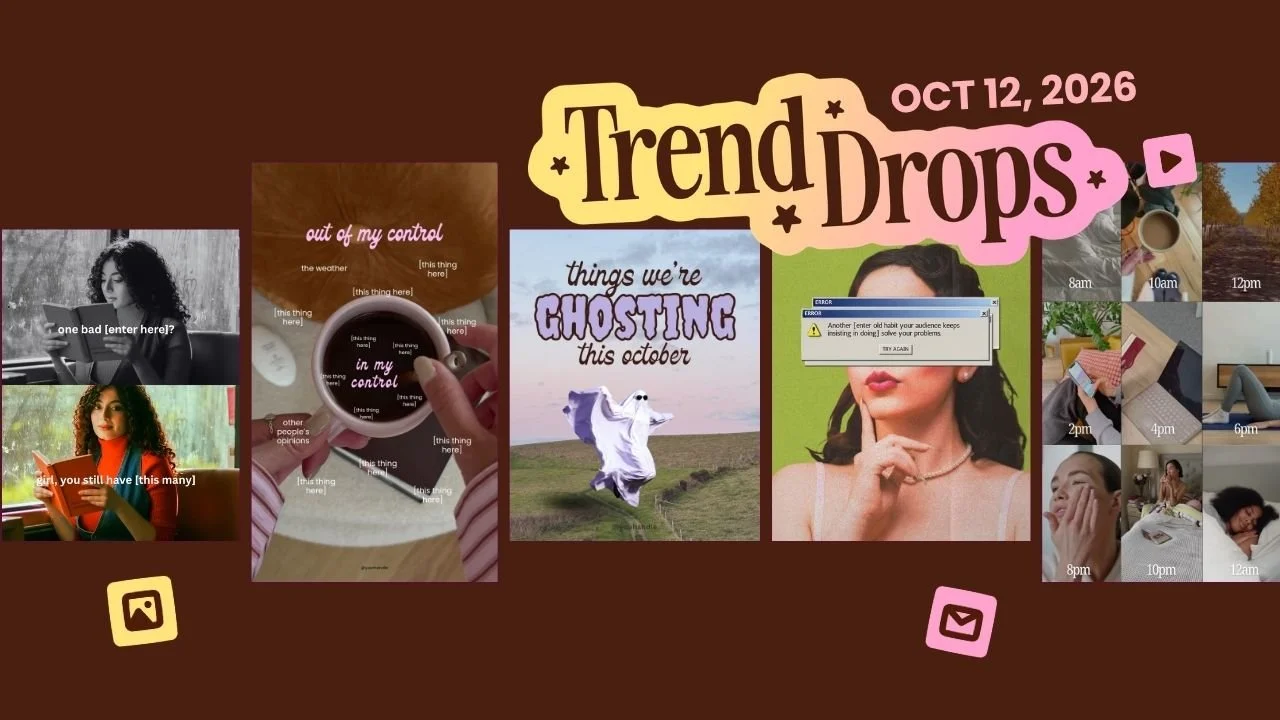
I've already posted two of this week's templates. The ghost one went up first, because of course it did. Then I posted the System Error Retro Post, mostly because I thought it looked cool in my feed.
And it did really, really well.
I did not see that coming. It's a quiet post. A vintage magazine photo, a grainy texture, a little message. No dancing, no animation, no Halloween. And people stopped on it anyway.
That's kind of the theme of this whole pack. Every trend this week puts something small in front of your audience and lets them feel it. A ghost floats past the stuff you're done with. One bad day sits next to the thirty good ones still coming. Your coffee cup holds the things you can actually control. These are posts people save because they see themselves in them.
And the twist, like always, is that we didn't stop at the trend. Every template here has a spot built in to sell your thing. Your product, your offer, your face. Because a post that gets saved is nice, but a post that gets saved and sends someone to your DMs is better.
So let's go through them, in order, with the Canva tips to make each one yours in minutes.
Want to try a FREE Trending Canva template?
Grab the latest Canva Template from inside of Your Template Club “Trend Drops” so you can test out one or two of out these timely, viral, trend templates for your business!
Trend One: Ghost Flying Through Slides Carousel
You've probably seen the things we're ghosting this October trend all over your feed by now. We took it and mashed it up with one of our most loved formats, the walking into the next slide carousel, and turned it into an animated Halloween carousel where a little ghost flies from one slide to the next.
What the Ghost Flying Through Slides Carousel is
The ghosting trend is simple. You list the things you're done with this October. We kept that idea and gave it a ghost who actually does the ghosting.
Your first slide says the trend line, things we're not ghosting this October. Then the ghost flies through the carousel, stopping on one thing at a time. He floats in, hangs out in the middle for a beat so people can read, and then keeps going to the next slide. It's one seamless animated carousel, so swiping feels like following him.
Here's our version's twist. The things on each slide are things your audience should not ghost. Drinking water. Their skincare. Their email list. And the very last slide is your offer. Not having someone manage their social media. Not having one of the necklaces from your new collection. Not having a coach to help them figure it out. Then you add your comment word so people can ask for the link.
We custom animated this ghost ourselves, so nobody else has this template. You only get it in Your Template Club.
Why the ghosting trend Instagram is loving is working
This trend works because it's a list post wearing a costume. People love a list. They love it even more when it's funny and seasonal and a little bit spooky.
The flying ghost animation does two jobs. It's fun to watch, so people swipe to see where he goes. And it slows people down on each slide, which is exactly what you want on a carousel. More time on your post, more swipes, more people reaching that last slide where your offer lives.
It's also a Halloween Instagram post idea that doesn't require a costume, a pumpkin, or you pretending to like candy corn. It's on theme without being cheesy.

How to customize the Ghost Flying Through Slides Carousel in Canva
The best part is what you don't have to touch. Leave the ghost alone. His path is already set, his timing is already set, and he's the same ghost for everyone. If you click on a slide and can't see him, don't panic. He's hidden until you hit Animate, and then you'll see his whole path.
You also don't need to resize anything or shorten the video. Instagram needs each video in a carousel to be at least five seconds long, so some slides keep playing for a moment after the ghost leaves. That's on purpose. We already set all of it up for you. The only time you'd change timing is if you swap in your own background video.
So your job is mostly typing. Write your things on each slide. Then find your handle. It's a little hidden, so don't forget it. You can keep it subtle or change it to white so it's easier to see.
The background image is pretty, but I'd swap it for something that feels more like your brand if you have one.
On the last slide there's a laptop where you can drag and drop any vertical image. If you sell products, drop in a photo of what you sell. If you're a coach or service provider, a photo of you works great. If you have a course or a program, a vertical image of your logo looks super cute in there. Add your comment word, and you're done.
Trend Two: System Error Retro Post
This is the one I'm obsessed with. It mixes the vintage magazine Instagram post trend with the retro tech aesthetic, and it's still very early, which means you can be one of the first in your niche to post it. I made two versions so you can see it used different ways.
What the System Error Retro Post is
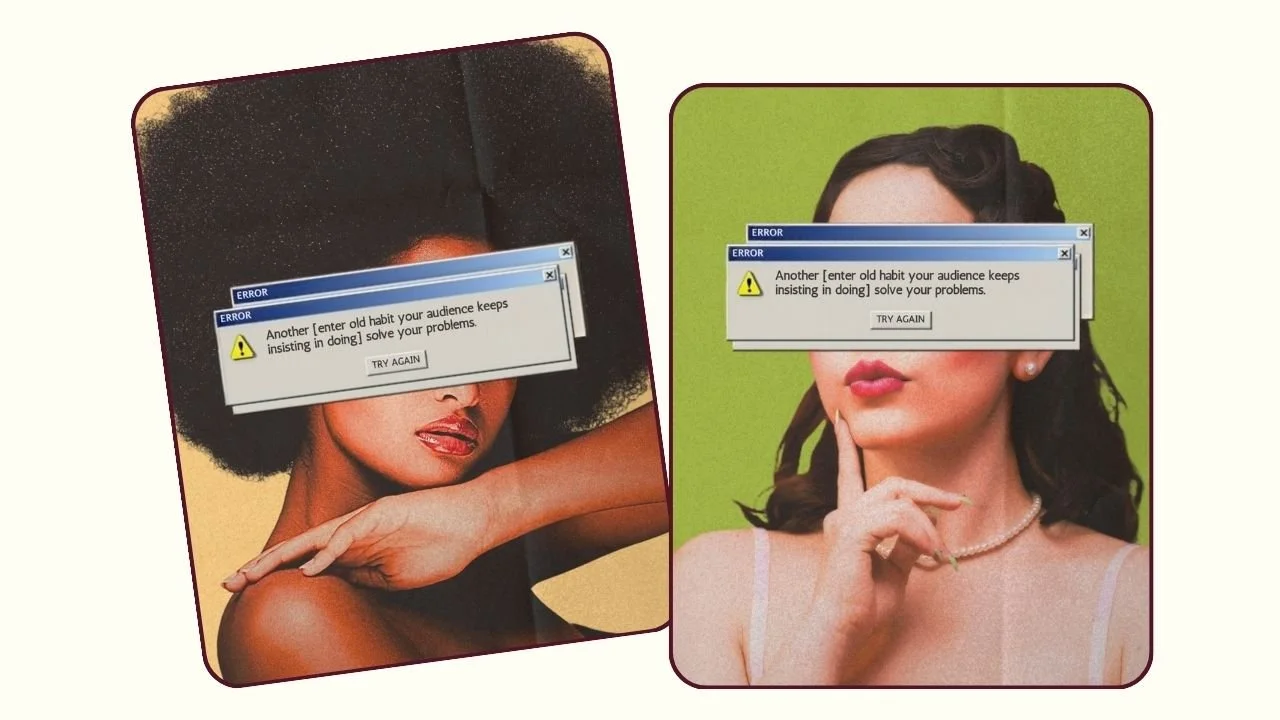
Picture an old magazine page. The photo is bright, super saturated, and a little too colorful in the best way. The paper has grain. The corner looks like it was folded. On top of it all sits a retro system error message, and that message is the part you make your own.
I custom created that texture layer, the grain and the folded magazine page effect, so it looks exactly how I wanted. Then we added a bunch of edits to the photo itself, so when you drop in your own photo, it takes on the same vintage magazine vibe automatically.
The message I wrote for mine is about your audience's old habits. Something like, another old habit your audience keeps doing will not solve their problems. It's a little brand statement dressed up as a computer glitch.
Why the vintage magazine Instagram post trend is working
Honestly? I didn't expect this one to do well. I just loved how it looked. It felt like a good brand statement post to have in my feed. And then it did really well on my account, which made me very excited to see how it does for you.
I think it works because it's different. Feeds right now are full of talking heads and text on b-roll. A retro tech post with a grainy magazine texture makes people stop because it doesn't look like everything else. And the system error message post format is a fun way to say something true without sounding preachy. The computer said it, not you.
This is a feed post that makes your account look like THAT account. You know the one. The one with taste.
How to customize the System Error Retro Post in Canva
This one takes a few small steps, so go slow the first time.
First, move the texture layer on top a little bit to the side. Just slide it out of the way. You need to get to the photo underneath.
Next, drag and drop your own photo right on top of the photo in the template. Since we already applied all the edits to that photo spot, your picture will pick up the same saturated vintage look. You don't have to edit it yourself. If one of the women in our photos happens to fit your content, you can keep her too.
Double-click your photo and move it up or down if you need to. Make sure you don't cut off your own head. We've all done it.
Then slide the texture layer back into place so the grain and the fold sit on top of your photo again.
Now the background. Right-click to find the background color and change it to your brand color. My tip: brighter, vintage-feeling colors work best on this one. I like the vintage green a lot, and a vintage orange would be great. I'll be honest, I don't think the pink works quite as well. But any brand color in that bright, retro family will look good.
Last, double-click the error message and change the text. Use mine or write your own.
Trend Three: Out & In My Control Reel
You might know this one as the in my control vs out of my control trend, or the things I can control trend. It's been going viral for a lot of accounts, and our version comes with a coffee cup. Or matcha, if that's more your thing.
What the Out & In My Control Reel is
The idea is a circle of control, but cuter. Outside the coffee cup are all the things outside your control. Inside the cup are the things you can control.
I already filled in a couple for you on the outside, like other people's opinions and the weather. There are a lot of little spots for more, and you don't need to fill all of them. Just aim for at least five.
Why the coffee cup Reel trend is working
It helps people put things in perspective, and people always want to send that kind of post to a friend. It feels like a deep breath.
You can make this one about your niche, or you can make it about life in general. For me and social media, the algorithm is out of my control. Whether I post, and how good my posts are, is in my control. But even if you go broader, like other people's actions on the outside, your audience still feels understood. That's what makes them relate, share, and feel connected to your brand.
Plus, the matcha aesthetic Reel look doesn't hurt. Pretty drinks have never once hurt engagement.

How to customize the Out & In My Control Reel in Canva
Type your out of control things into the spots around the cup. Delete any spots you don't use, so there aren't empty boxes floating around. Keep at least five.
Then type your in my control things inside the cup.
Think about what your audience stresses over. A wedding photographer might put the weather outside and the shot list inside. A product seller might put shipping delays outside and great customer service inside. That's it. This mindset Reel template takes a few minutes, and most of that is deciding what to write.
Trend Four: One Bad Day? Carousel
This is the one bad day trend, a simple mindset carousel that pairs a color photo with a black and white version to make a point. It's very visual, very easy, and it works for any niche.
What the One Bad Day? Carousel is
Each slide reminds people that one bad thing is not the whole story. One bad day? Girl, you still have another thirty this month. One bad post? Post another one tomorrow. One bad week? You still have fifty-one.
The black and white photo carousel effect is already built in. Drop in your photo, and it shows up in black and white where it needs to.
Why the motivational Instagram carousel is working
We all focus on the one bad thing. The one bad post, the one bad client call, the one bad week. This perspective carousel flips that around and reminds people how many chances they still have.
That kind of message is pretty universal. Everybody needs to hear it sometimes, so they save it and send it. That's the stuff that grows your account.

How to customize the One Bad Day? Carousel in Canva
You've got three ways to do the photos. Use the exact same photo twice, and the black and white is already applied for you. Use two totally different photos. Or do what I did and use similar photos from the same photo shoot.
Then change the text on each slide to fit your audience. A fitness coach could write one bad workout. A shop owner could write one slow sales day. This is your go-to when you want a high-impact carousel but don't have much time.
Trend Five: Daily Routine Grid Reel
The daily routine Reel is a classic, and this is a new version of it. It's a video grid Reel with a lot more parts of your day, so it works like a day in the life Reel and a video collage at the same time.
What the Daily Routine Grid Reel is
You drop in short videos from different parts of your day. Morning coffee, work, the school run, the gym, dinner, bed. They all play together in a grid, like a split screen Reel with a lot more squares.
I used videos of different people in the template, but you'll use your own. If any of ours fit your brand, feel free to keep them.
Why the day in the life Reel format is working
People buy from people. A day in my life Instagram post shows the person behind the business, and that's what builds trust.
There's also a funny way to use it. Put the exact same video in every spot. Your dog, your dog, your dog, your dog. Or you working on the same thing all day. Or waking up, doing the same thing over and over, then going to sleep. Repeating one clip makes the joke for you.

How to customize the Daily Routine Grid Reel in Canva
Drag and drop your videos into each spot. Then trim them.
This is the big tip for this multi video Reel template. Trim every video to the same length, five or six seconds each. If one video is eight seconds and the rest are five, the short ones start over while the long one is still playing. It just looks a little off.
To trim, click on the video, find the timing, and set it to match the others. Do that for every clip, and your grid will loop together nice and clean.
Which October Instagram Trend Should You Post First?
Start with the System Error Retro Post. It's still a very early trend, so posting it now puts you ahead of the wave. It also did really well on my account, and it's an easy feed post that makes your whole grid look better.
Post the Ghost Flying Through Slides Carousel next, and get it up well before October 31. The things we're ghosting this October trend has a hard deadline. Once Halloween is over, this Halloween carousel is done for the year. Aim for the next week or so.
The Out & In My Control Reel is great for midweek, when your audience needs a breather. It's popular right now and easy to share.
The Daily Routine Grid Reel is perfect for the weekend, when people are in the mood to get to know the person behind the business.
Save the One Bad Day? Carousel for a slow week. It's timeless, it's quick to make, and it will be just as good in November as it is today.
If you are already inside Your Template Club, log in and grab this pack. If you have been thinking about joining, this week is a great time to see exactly what you get with every Trend Drop.
Trending Templates Released as Instagram Trends Emerge
When you join Your Template Club, you get access to Trend Drops — short, timely template packs inspired by the latest viral Instagram trends, so you can jump on trends early without spending hours figuring it out. We do the research, design, and strategy for you.

Photo: KVC Photography
About Manu Muraro
Manu Muraro is the founder of Your Social Team, a content marketing brand helping small business owners grow through strategic email marketing and Instagram content.
She’s the creator of Your Template Club, one of the first Canva template subscriptions designed for Instagram, and the founder of Your Inbox Team, a weekly email marketing membership that helps entrepreneurs send consistent, high-converting emails in under 15 minutes.
Manu is also the creator of The Reelies Awards, the first award show celebrating Small Business Owners and Creators’ creativity and originality in Instagram Reels.
A former creative strategist at Cartoon Network, Manu brings award-winning experience to everything she creates — from viral Reels to done-for-you content that saves time and drives results.
👉 Follow Manu at Your Social Team on Instagram