
5 Instagram Trends You Can Post Today (Trends for June: Week 4)

It is still World Cup season, summer is in full swing, and Instagram is in its silly, self-aware era right now. The kind of posts doing well this week are the ones that make people laugh because they feel a little too seen. So that is exactly what this Trend Drop leans into.
This week's Trend Drop has five templates, and they are all completely different from each other, which I love.
You have got a cheeky Reel that turns a photo into a "video" just because Instagram made you, an interactive carousel where a little car drives across every slide and loops back to your point, a World Cup match schedule built around the games your audience actuallyplays, a dreamy summer wish list post, and a split-screen Reel you can run two totally different ways. Something in here is going to work for you this week. Let's go through all of them.
Want to try a FREE Trending Canva template?
Grab the latest Canva Template from inside of Your Template Club “Trend Drops” so you can test out one or two of out these timely, viral, trend templates for your business!
Trend One: Instagram Demanded Reels
This one is so dumb and I mean that as the highest compliment. The whole joke is "I wanted to post a photo but Instagram demanded a Reel." So you take a still photo, barely animate it, and post it as a video because Instagram basically forced your hand. It is grumpy, it is sassy, and your audience will get the joke the second they see it.
Here is how our template works. There is a rectangle around the subject that looks like the Canva canvas selection tool, and we built a silly little animation on it that is already done for you. You do not have to recreate anything or risk messing it up. All the elements are grouped and they stay grouped, so the animation stays intact.
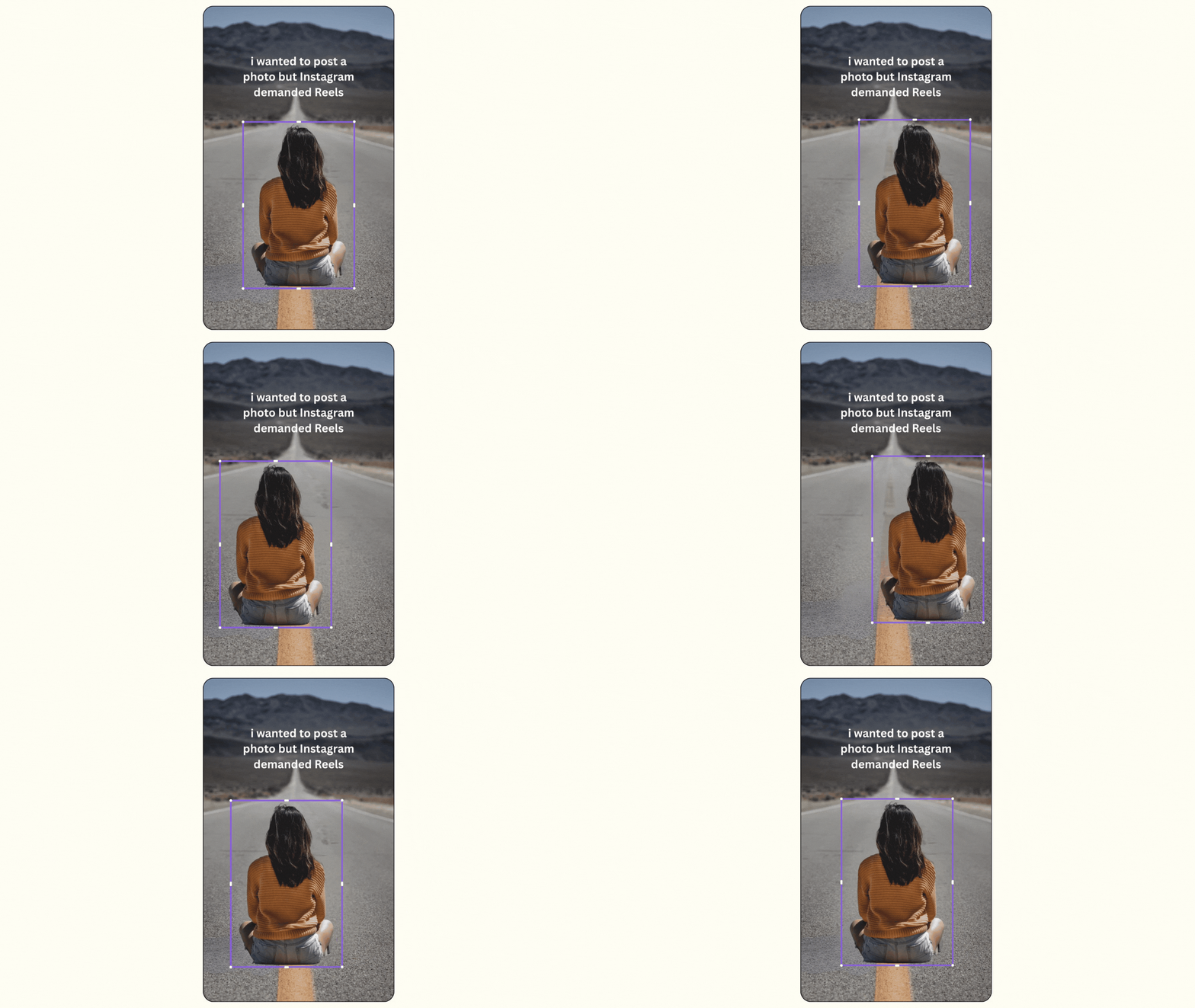
Your job is the easy part. Change the background to whatever you want, your house, your workspace, anything. Then grab a full body photo of yourself or your product. Full body works way better here because you want some space around the subject and you do not want anything getting cropped. Make your photo roughly the same size as the rectangle, then just drag and drop it in. That applies the animation and the effects for you automatically. From there you can nudge it bigger or move it around, but do the same-size drop first so nothing gets cut off.
One quick thing. Make sure your text is readable against your background. If you need to switch it to a darker color so it pops, do it. Otherwise leave it white. That is the whole trend. It is fast, it is funny, and it is a great one to post on a day you do not feel like overthinking it.
Trend Two: The Buttttt Video Carousel
This is the hottest one this week and the one I would post first if you only have time for one. It is an interactive carousel where a little car drives "buttttttt..." across each slide and loops all the way back around to land on your point. As people swipe, the car keeps moving. It is so satisfying to watch and it is perfect for teasing an offer or a win. Think "probably just needed a break, butttt [did this thing] instead."
Everything in this template is already custom-animated, including all the elements on the final slide. The car starts on one frame and continues from frame to frame as you swipe through. Canva can make animations a little hard to preview inside the editor, so do not panic if it looks off in there. Save each page as a video and you will see it working exactly the way it should.

This one takes a tiny bit more than drag and drop, but I will walk you through it. If you want to swap the car for your own element, an emoji, a cutout of yourself, your product, whatever, here is the trick. Get your new element to the size you want it, place the original animated one in the middle of the screen, then use copy style to copy the animation onto your element. Delete the original, position your new one where it needs to go, and it is animated the same way. For elements at the edges, leave a little bit of them peeking onto the screen so you do not lose them as they move. And make sure your new element sits on top, so you can use position or the layers panel to drag it above the text.
When you are done, save every single page as its own video. They are already five seconds, which is exactly what Instagram needs. Post it as a carousel and the little car keeps driving as people swipe. I did one with The Reelies trophy and it came out so cute. If you get stuck anywhere, that is what the group is for. Show me, ask me, I am happy to help.
Trend Three: Match Schedule
World Cup season, but make it the real games your audience plays. This one sets up a match schedule for your niche, like a "[your niche] girlie cup," with matchups between the two sides of your audience or the two sides of yourself.
Think "answer comments vs. post and ghost" or "post every day vs. only lurk" or "full hair and makeup, styled, living the dream vs. I need to get a job." So relatable it hurts. For me it could be all of those. For your people it will be something completely their own. You are basically holding up a mirror and letting your audience recognize themselves in the matchups.

Here is the one thing to know about this template on purpose. It is not meant to be super aesthetic. It is built to look like a real sports schedule, very World Cup, very soccer, very chaotic in the best way. That is the whole vibe.
You can absolutely match it to your brand colors and clean it up a little, and you should, but do not feel like you need to make it precious. The fun is in how recognizable the matchups are, not in how polished it looks. Use the same photo across the matchups, swap in different photos, use logos in different colors, whatever works for you. Play with it.
Trend Four: Summer Wish List
This is the dreamy poolside one everyone is posting right now, and it is quietly really effective. You scatter the little things your audience secretly wants over a summery photo, and it instantly tells them they are in the right place.
The content is where this one comes alive. Think about the small stuff your people actually daydream about. Iced coffee. Eight hours of sleep. The group chat. A full inbox of new subscribers. A week where nothing breaks. Whatever your niche secretly wishes for, pile it on. The more specific and a little funny you get, the more your audience looks at it and thinks "yes, all of that, immediately."
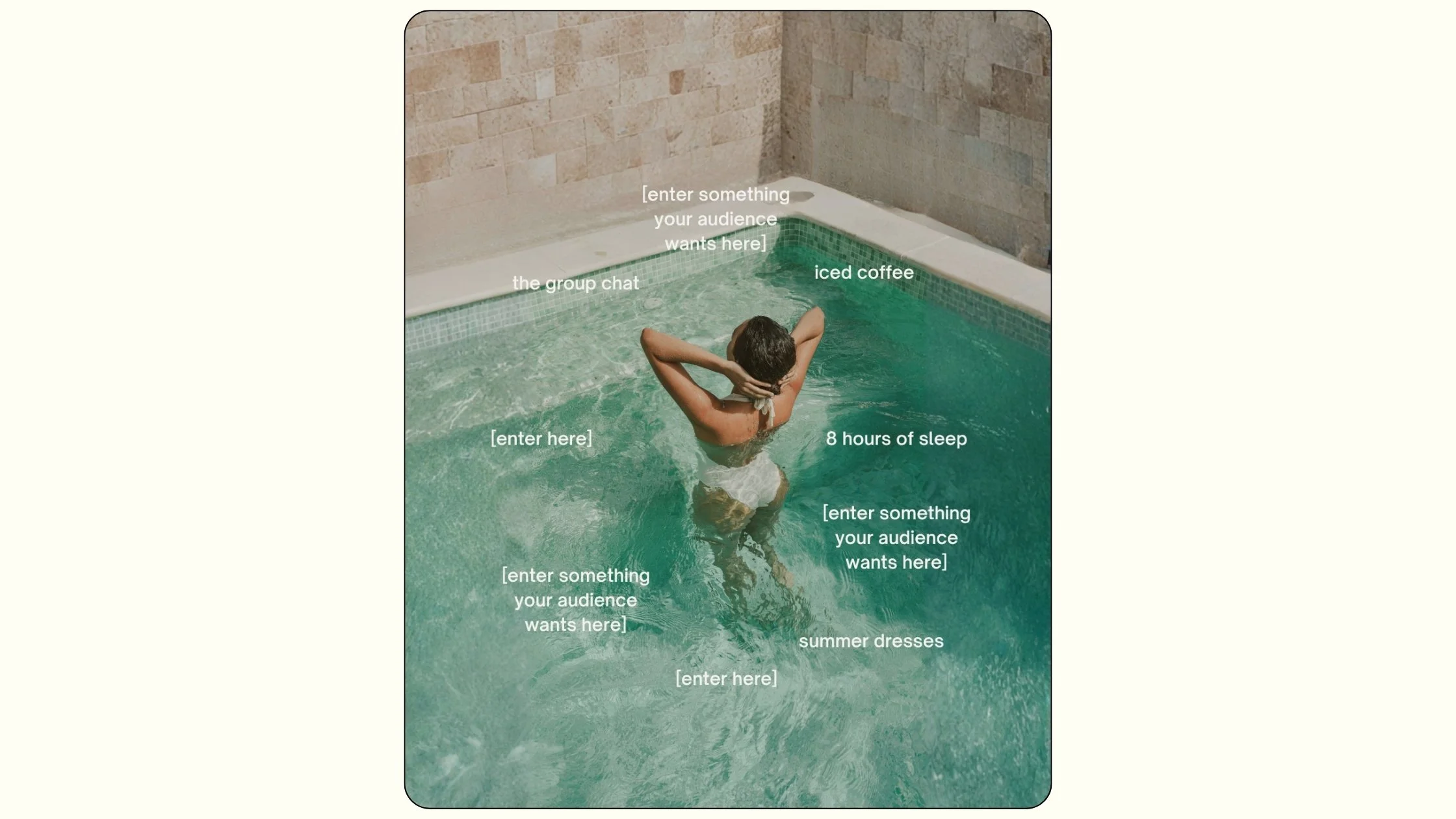
A couple of design notes. Keep the text the same font size where you can, because that consistency is part of the trend look. Yellow text is really trending on Instagram right now, so if you want to swap your text to yellow, both the darker and lighter yellow look really cute here. Just keep an eye on contrast against whatever photo you use so everything stays easy to read. And if you can find a photo that is more aesthetic than a plain headshot, something summery and dreamy, it leans into the trend even harder. But honestly, use whatever you have. It still works.
Trend Five: 4 Horizontal Videos Reel
This is the split-screen Reel going viral everywhere, and I love it because you can run it two completely different ways depending on what you want to say.
Way one is the simple version. Four videos showing the times of your day, like 9am, 12pm, 3pm, 8pm. Everyone can use this one. Drop in any four clips, customize a couple or all of them, and you are done. Way two is the storytelling version, and this is the one I really like, especially for educational accounts, creators, personal brands, or products. The flow goes: you think you are not good enough to do the thing, you try it anyway, you start seeing results, and then a big win or a big payoff at the end. It pulls people right in.
A few tips to make it land. Trim each clip to five seconds. That is plenty for this format. Keep your text short, do not cram too much on screen. We already added a little transparent darker layer behind the text so it stays easy to read, so just make sure it is working with whatever videos you choose. And for the storytelling version, you do not need to film yourself doing every single thing. Mix in some aesthetic b-roll that does not show a person at all. It actually looks better that way and it is way easier to pull together. Save it as one video and post it as a Reel.
Why These Five Trends Work Together
When I look at all five of these, the thing they have in common is that every single one of them makes your audience feel seen.
The Instagram Demanded Reels post makes them laugh at the silly reality we are all living in.
The Buttttt carousel teases something in a way that keeps them watching.
The Match Schedule shows them the two sides of themselves they already know too well.
The Summer Wish List names the little things they secretly want.
And the split-screen Reel either mirrors their everyday or tells the story of how they got where they are.
None of these ask you to be someone you are not. You are just taking a format that is already working and filling it in with something real for your people. That is the whole game, and that is why templates work. The hard part is the concept and the timing. We handle both. You just fill in what only you know.
That is the whole idea behind Trend Drops. Instagram moves fast. A format that is fresh and getting traction today can feel old in two or three weeks. When we spot something gaining momentum, we build the template and get it into the club while the timing is still right, so you can post early and get more reach before everyone else catches on.
If you are already inside Your Template Club, log in and grab this pack. If you have been thinking about joining, this week is a great time to see exactly what you get with every Trend Drop.
Trending Templates Released as Instagram Trends Emerge
When you join Your Template Club, you get access to Trend Drops — short, timely template packs inspired by the latest viral Instagram trends, so you can jump on trends early without spending hours figuring it out. We do the research, design, and strategy for you.


Photo: KVC Photography
About Manu Muraro
Manu Muraro is the founder of Your Social Team, a content marketing brand helping small business owners grow through strategic email marketing and Instagram content.
She’s the creator of Your Template Club, one of the first Canva template subscriptions designed for Instagram, and the founder of Your Inbox Team, a weekly email marketing membership that helps entrepreneurs send consistent, high-converting emails in under 15 minutes.
Manu is also the creator of The Reelies Awards, the first award show celebrating Small Business Owners and Creators’ creativity and originality in Instagram Reels.
A former creative strategist at Cartoon Network, Manu brings award-winning experience to everything she creates — from viral Reels to done-for-you content that saves time and drives results.
👉 Follow Manu at Your Social Team on Instagram