
How to Rearrange Your Instagram Grid — The New Feature Everyone's Been Waiting For

Instagram just launched one of the most requested features in its history: you can now rearrange posts on your profile grid. No more archiving and reposting. No more workarounds. Just drag, drop, done.
I got early access from the Instagram team — here's everything you need to know.
What Is the Instagram Grid Reorder Feature?
For years, the only way to change the order of posts on your Instagram profile was to delete and repost them — or archive them and bring them back in a different sequence. It was messy, time-consuming, and you'd lose all your likes and comments in the process.
Instagram has now built a native grid reorder tool that lets you drag your posts into any order you want, directly from your profile.
Before This Update: The Old Workarounds
If you wanted to control your grid order before this feature existed, your options were painful:
Archive and repost — you'd lose all likes, comments, and shares accumulated on that post
Delete and repost — same problem, plus you'd lose the original caption and tags
Third-party grid planning apps — tools like Later, Metricool, Preview or Planoly let you plan your grid visually, but you still had to post in the right order from the start
Pin posts — Instagram's pin feature helped surface specific content, but you were limited to 3 pinned posts and couldn't control the rest of the grid
All of these were workarounds for a problem that should have been solved natively years ago. Now it is.
How to Rearrange Your Instagram Grid (Step-by-Step)
Open Instagram and go to your profile
Long-press any post on your grid
Tap "Reorder Grid" from the menu that appears
Drag your posts into the order you want
Tap Done to save your new layout
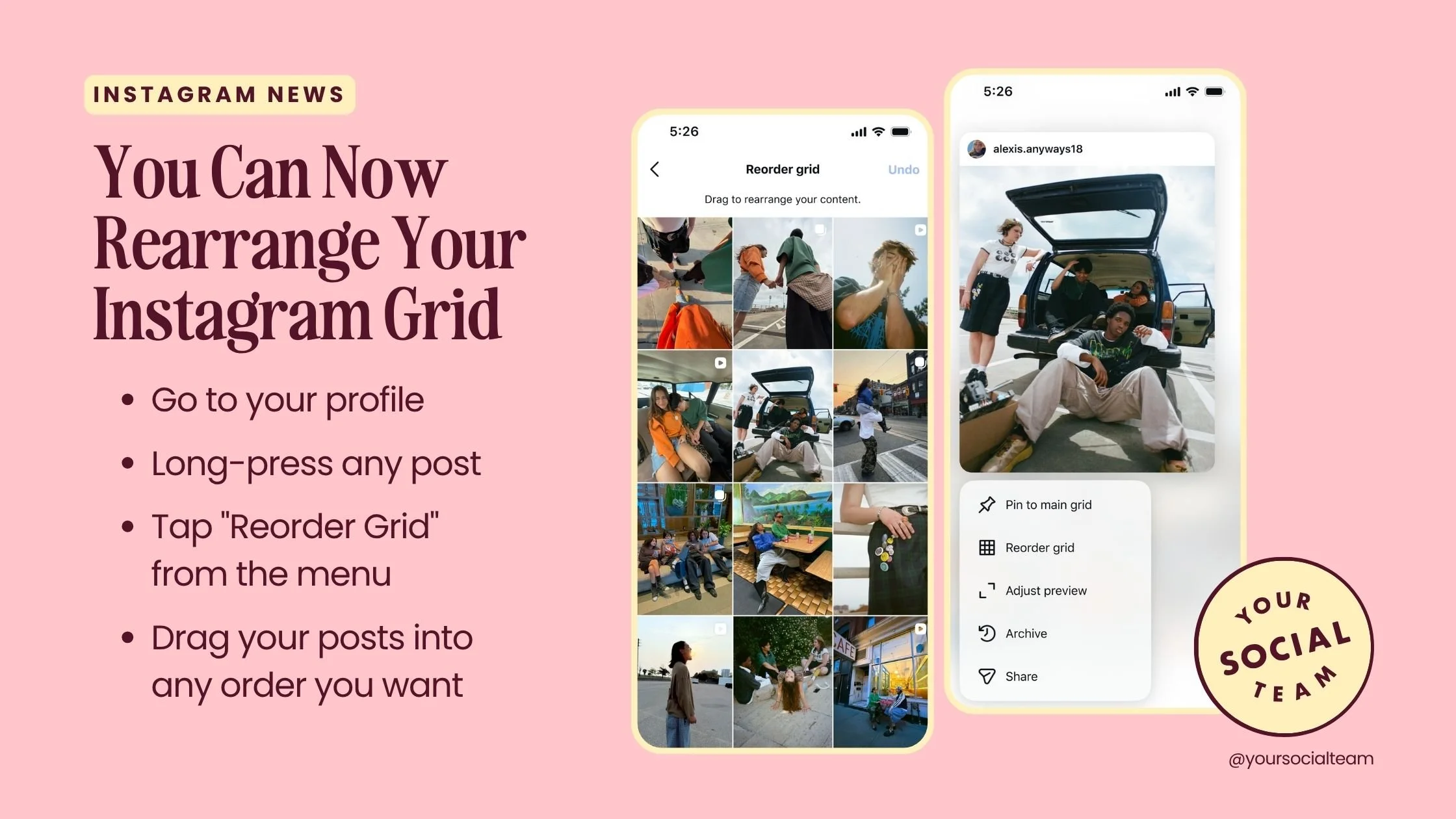
That's it. No archiving. No reposting. No losing engagement.
One Important Thing to Know: How About Pinned Posts? 📌
If you have pinned posts or Reels at the top of your profile, they stay fixed. You cannot move them with the reorder tool — they will always appear first.
Only your non-pinned posts can be rearranged. Keep this in mind if you're planning a full grid redesign.
Why Instagram Built This Feature
Instagram designed the grid reorder feature for creative control and visual expression. The idea is simple: your profile grid is a canvas. The order of your posts shapes the aesthetic, the mood, and the story your profile tells at a glance.
For photographers, artists, and visual creators, this is huge. You can now arrange your work the way you'd hang it in a gallery — by color palette, theme, era, or campaign — without being locked into reverse-chronological order.
For everyone else, it opens up a level of profile curation that was previously only possible with a lot of manual effort.
How Small Businesses and Creators Should Use This To Get More Followers 🧠
Here's where it gets interesting. Instagram built this for aesthetics — but smart creators and small businesses can use it as a growth tool.
Your profile grid is the first thing a new visitor sees when they land on your page. That moment — before they've decided whether to follow you — is your most important real estate on the platform. What you show them in those first 9 to 12 posts will determine whether they hit follow or leave.
Here's how to use the reorder feature strategically:
Put your most valuable content at the top
Look at your Instagram Insights and sort your posts by saves and shares — not likes. Saves and shares are the strongest signal that a piece of content delivered real value to your audience. Those are the posts that made people think "I need to come back to this" or "my friend needs to see this."
Move those posts to the top of your grid. When a new visitor lands on your profile, the first thing they see is your most useful, most resonant content — and they're far more likely to follow you for more.
Lead with content that explains what you do
If you have a post that clearly communicates who you are, who you help, and what kind of content you create — that belongs near the top too. Think of it as a visual bio. New visitors shouldn't have to scroll to understand your value.
Create a "best of" first impression
Think of the top row of your grid (the first 3 posts) as a headline. They're the first thing anyone sees. Curate them intentionally — whether that's your three best-performing posts, your three most recent campaign pieces, or a visual triptych that looks great together.
A New Add-On Service for Creators Working With Brands
Here's an angle most creators haven't thought about yet: grid placement as a paid service.
If you work with brand partners, you can now offer to keep their sponsored post higher up on your grid for an extended period — making it visible to every new profile visitor who comes to your page, not just the people who saw it when it was first posted.
This is a legitimate value-add you can include in brand partnership packages. Instead of a sponsored post disappearing into your archive after a few days, it stays front and center for as long as the partnership terms specify. For brands, that's ongoing visibility. For you, it's a new line item in your rate card.
Want to try 2 of our Trending Canva Templates for Instagram for FREE?
Fill our the form below and we will send it to you!
By submitting this form you will be added to Your Social Team’s email list. We respect your privacy.
Tips for Redesigning Your Grid
Before you start dragging everything around, a few things worth doing first:
Audit your top posts by saves and shares in Instagram Insights before you move anything
Screenshot your current grid so you have a reference if you want to revert
Plan in a grid app first — tools like Preview let you mock up the new order visually before committing
Think in rows of 3 — Instagram grids display in rows, so consider how each row of 3 posts looks together, not just individual posts
Is the Feature Available to Everyone?
According to the Instagram team the feature is rolling out globally. If you don't see it yet, make sure your Instagram app is updated to the latest version. It may take a few more days to reach your account.
Do you have it yet? Let us know in the blog comments below!
Frequently Asked Questions
Does reordering my grid delete my likes and comments?
No. Reordering only changes the position of your posts on your profile. All engagement — likes, comments, shares, saves — stays exactly as it is.
Can I undo a grid reorder?
Yes. While you're in the reorder view, there is an Undo option. Once you tap Done and exit, you would need to manually rearrange again.
Does this work on desktop?
Currently the feature is available in the Instagram mobile app. Desktop functionality has not been confirmed.
Can I reorder Reels separately from posts?
The reorder tool applies to your main profile grid. Reels that are pinned stay fixed at the top and cannot be moved with this tool.
The Bottom Line
This update sounds simple — but it changes how you should think about your entire Instagram presence. Your grid is no longer a permanent record of when you posted things. It's a curated portfolio you can shape at any time, and the smartest creators will use it as a conversion tool, not just an aesthetic one.
Save this and send it to someone who needs it.
Follow @yoursocialteam for updates straight from the Instagram team.

Photo: KVC Photography
About Manu Muraro
Manu Muraro is the founder of Your Social Team, a content marketing brand helping small business owners grow through strategic email marketing and Instagram content.
She’s the creator of Your Template Club, one of the first Canva template subscriptions designed for Instagram, and the founder of Your Inbox Team, a weekly email marketing membership that helps entrepreneurs send consistent, high-converting emails in under 15 minutes.
Manu is also the creator of The Reelies Awards, the first award show celebrating Small Business Owners and Creators’ creativity and originality in Instagram Reels.
A former creative strategist at Cartoon Network, Manu brings award-winning experience to everything she creates — from viral Reels to done-for-you content that saves time and drives results.
👉 Follow Manu at Your Social Team on Instagram