

I almost didn't make one of the templates in this week's pack.
The eye test meme has been going back and forth on my feed for a while. I'd see it, scroll past, see it again, and argue with myself about whether it was still worth making. Then it kept showing up. And it kept being funny. So it made the cut, and honestly I'm glad, because it turned out to be one of the easiest sells in the whole drop.
That little argument with myself is a good way into this week. Every trend in this pack does the same job in a different outfit. It helps the right person look at your account and think, oh, she gets me. I'm in the right place.
Some do it by showing who you are. Some do it by making your follower see themselves. And a couple do it by sneaking the thing you sell right into the joke.
That's the twist we built into every template. The original trends are fun. Our versions are fun and they point at your business. Your product goes last in the love triangle. Your service is the answer to the eye test. Your offer becomes one of the "but I'm also" lines.
So let's go through them, in order, with the Canva tips to make each one yours in minutes.
Want to try a FREE Trending Canva template?
Grab the latest Canva Template from inside of Your Template Club “Trend Drops” so you can test out one or two of out these timely, viral, trend templates for your business!
Trend One: It’s Cool to do both carousel
You've probably seen the "by the way, it's cool to do both" trend in your feed. Big simple text, a calm photo, and a message that gives people permission to stop picking just one thing. It's one of the most quietly saveable carousel trends going right now.
What the It’s Cool To Do Both Carousel is
Each slide is short, bold text over an image. The original trend is a photo in a photo, a smaller picture sitting inside a bigger one. Clean, but flat.
Our version uses a cutout instead. You drop in your own photo, remove the background, and let a little piece of you, like a hand or the top of your head, sit just in front of the text. You can still read every word, but now the slide has depth and it looks like you made it, not like you grabbed a template.
Then we went one more step. Every slide pairs one photo with one video, and the video sits in the bottom part of the slide. That's the video background in this cutout carousel, and it's why people keep swiping.
Why the "by the way, it's cool to do both" trend is working
This audience is tired of being told to choose. Run the business or rest. Post the sales post or the personal post. Be a mom or be ambitious. A carousel that says "it's cool to do both" lands like a deep breath, and people save it and send it to the friend who needs it.
The video matters too. Our eyes catch movement before we read anything, so a slide that moves gets a longer look than a still one. I'll be honest, I was surprised by how well this one did for me. It's very simple text. But simple text with a cutout and a little motion is exactly the kind of encouraging Instagram carousel that gets saved.
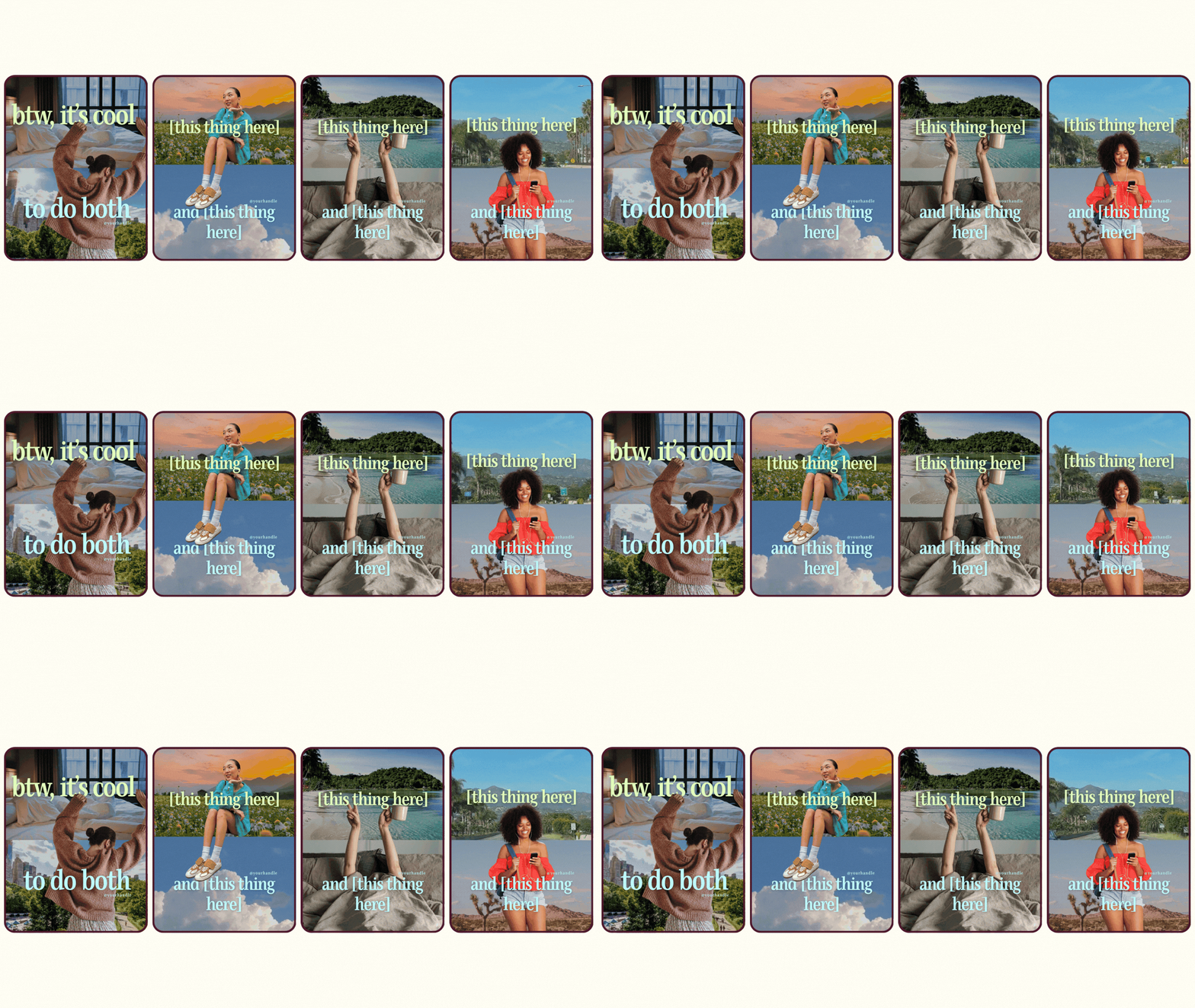
How to customize the it's cool to do both carousel in Canva
You don't have to change every single thing. I'd start by swapping one photo or one video on each slide, or just a couple across the carousel, and leave the rest.
To find the video spots, click around the slide. Any element with a little play button is a video. Swap it for one of yours or for stock footage you like. If your brand is more minimal and subtle, shadow photos look really pretty here.
When you add a video, click on it and set the duration to 5.1 seconds. Instagram needs at least five seconds for a video, and that 4.9 second download taught me not to cut it close.
For the cutout, upload your photo, remove the background, and replace the image that's already there. Nudge it so a little bit overlaps the text, but not so much that the words get hard to read. If you have to squint, pull it back.
Trend Two: Toggle Switch Button
This is the toggle switch Reel where someone taps their phone screen and a big toggle flips from off to on, right on the beat of the audio. You may have seen it called the toggle button trend or the tap to turn on Reel. It's the only trend this week that takes a little patience, and it's worth it.
What the Toggle Switch Button is
The Reel shows an iPhone-style toggle. It starts gray, and when the beat hits, it flips green and turns "on." The text next to it is whatever you want to switch on: a new offer, a sale, your waitlist, your hot take for the week.
There's an audio that goes with this trend, and I'll link it for you so the timing matches.
You can use it two ways. If you're more of a beginner and filming yourself feels like a lot, just use the toggle animation on its own over a video. If you're up for filming, you walk into the frame, tap once, tap twice, then jump up and tap, and that final jump-tap is the moment the toggle flips green.
Why the toggle button trend is working
It's a visual hook that pays off fast. People see a switch, they want to see it flip. That tiny "wait for it" moment keeps them watching, which is exactly what you want from an announcement Reel.
And it makes a reveal feel fun instead of salesy in the cringe way. You're not shouting "NEW OFFER." You're flipping a switch. Same news, way better energy. We love to be salesy, and this is a really cute way to do it.

How to customize the toggle switch Reel in Canva
When you open the template and press play, you won't see the whole thing. Click on the element that says "edit video." That opens the video timeline, and now you can see how it all fits together.
Click the toggle to change the text to your own. If you want, you can also click the green and change it to your brand color.
Do not touch the timeline. I mean it. The timing is already lined up with the audio, and it's perfect. Leave it alone.
If you're filming yourself, record your walk-in, tap, tap, jump and tap. Drop the video into the template and remove the background. Then go into the timeline and slide your clip back and forth until your final jump-tap lands right when the gray toggle turns green. That's the only tricky part. Once it lines up, you're done.
If you get stuck on this one, ask us. That's what we're here for.
Trend Three: Ghost your ex sign meme
It's the last week of October, so of course we had to have a ghost. The ghost your ex meme is the aesthetic sign trend where a little ghost holds up a sign that says "ghost your ex, not your..." and you finish the sentence. It's a Halloween Instagram post idea that actually says something.
What the Ghost Your Ex Sign Meme is
A cute ghost, a background, and a sign. The sign reads "ghost your ex, not your" and then the thing your audience shouldn't give up on. Not your audience. Not your gym. Not your skincare. Not your email list, if you ask me.
I made four different styles so you have variety. The ghost is a cutout, so you can keep it, swap in a different ghost, or put your own photo (or someone else's) under the sheet. You can change the background in any of the four to make it feel more on brand for you.
Why the ghost your ex meme is working
It's funny first and useful second, which is the right order. Everybody gets the joke about ghosting an ex. Then the second half sneaks in your message: the thing your customer has been ignoring that you or your product can help with.
It's also seasonal, and seasonal posts feel timely. A Halloween ghost meme going up this week tells people you're paying attention, and that's a big part of why they trust you.
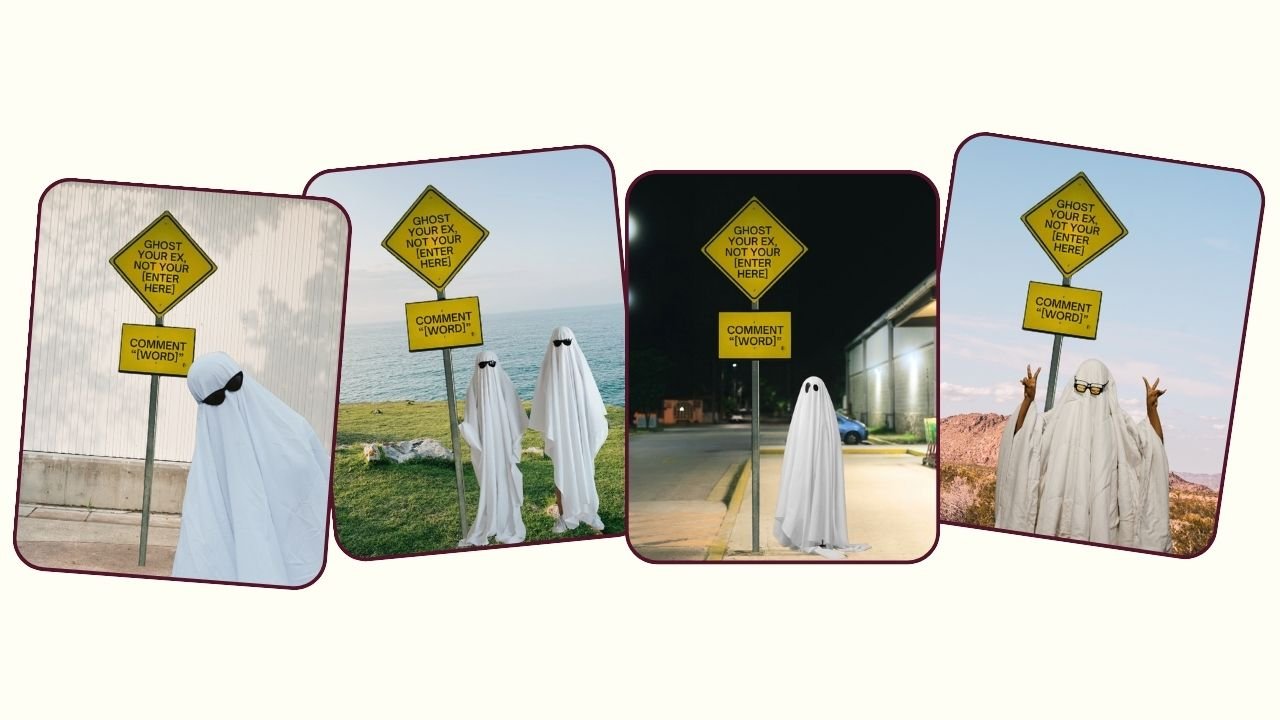
How to customize the ghost sign meme in Canva
Change the words on the sign first. Finish "ghost your ex, not your..." with whatever fits your business. A personal trainer might say "not your gym." A stylist might say "not your wardrobe." A product seller can name the problem their product fixes.
To swap the ghost, click it and replace it with another cutout. If you want to be the ghost, upload your photo, remove the background, and drop it in.
To change the vibe, replace the background with one of your own photos or a brand color. Pick the style out of the four that feels most like you and post that one.
Trend Four: notes app animated reel
The Notes app Reel is everywhere right now, part of the whole iOS core aesthetic where posts look like they came straight off your iPhone. Ours has typewriter text that types itself out over your video.
What the Notes App Animated Reel is
It looks like an iPhone note. There's a little date at the top, and your text types out line by line like you're writing it in real time. Behind it, your own video plays.
You can put anything in the note. A call to action. An announcement. A hot take. A little list of what's new this week.
Why the Notes app Reel is working
It feels personal. A note on your phone is where you write the real stuff, so a Notes app Reel reads like you're letting people in on something, not like an ad.
The typewriter animation also gives people a reason to wait. They want to see what the note says, so they keep watching while it types out. That's watch time you didn't have to beg for.

How to customize the Notes app Reel in Canva
Type your message into the note. The typewriter animation is already set up, so you don't need to add anything.
Check the date at the top and change it to match when you post. If you don't want to deal with the date at all, delete it. I like how it looks, but nobody will miss it.
Then drop your own video into the background and trim it to fit. Go by how much text you wrote. A short note needs about five seconds. A longer one can go up to ten. And remember the 5.1 rule for the shortest version.
Trend Five: In a relationship facebook meme
This one is very early, so you'll be ahead of the crowd. It's the Facebook relationship status meme, where someone is "in a relationship" with a brand they love, like the old Facebook notification we all remember.
What the In A Relationship Facebook Meme is
It's styled like a Facebook relationship update. A person is listed as "in a relationship with" a brand, a celebrity, or something they're obsessed with.
The way I played with it, the brand replies, "hey, but I never said I was exclusive," and the person answers, "oh, but I love you so much." It's silly and a little dramatic, and that's the point.
Why the in a relationship with a brand meme is working
It taps into nostalgia. Most of our audience remembers when Facebook relationship statuses were a big deal, so it gets a laugh right away.
It also says something every business owner wants to hear out loud: people are obsessed with what you sell. When a customer is "in a relationship" with your brand, it's social proof dressed up as a joke.

How to customize the relationship status meme in Canva
Change the brand name to yours. Put your customer's name (with permission) or a made-up name in the relationship line, and adjust the back-and-forth so it sounds like your brand.
You can use a stock photo or your own photo for the profile picture.
If you work with brand partners, this is also a super cute way to recommend one. Put yourself "in a relationship" with a brand you love and tell people why.
Which October Instagram Trend Should You Post First?
Start with the Toggle Switch Button. It's the one I'd post first, as long as you're up for the timeline. It's the best fit for an announcement this week, and the sooner you post a trend with audio, the better.
Next, post the It’s Cool To Do Both Carousel. It did really well for me, and it's easy to customize, so it's a great second post.
The Ghost Your Ex Sign Meme has a hard deadline. Halloween is Saturday, October 31, so post it that day or anytime before. After the 31st, a ghost meme feels late.
Post the In A Relationship Facebook Meme soon, while it's still early. Early trends are where you get the most attention.
The Notes App Animated Reel is the one that can wait. The iOS core look isn't going anywhere, so save it for a slower week when you need an easy announcement.
If you are already inside Your Template Club, log in and grab this pack. If you have been thinking about joining, this week is a great time to see exactly what you get with every Trend Drop.
Trending Templates Released as Instagram Trends Emerge
When you join Your Template Club, you get access to Trend Drops — short, timely template packs inspired by the latest viral Instagram trends, so you can jump on trends early without spending hours figuring it out. We do the research, design, and strategy for you.
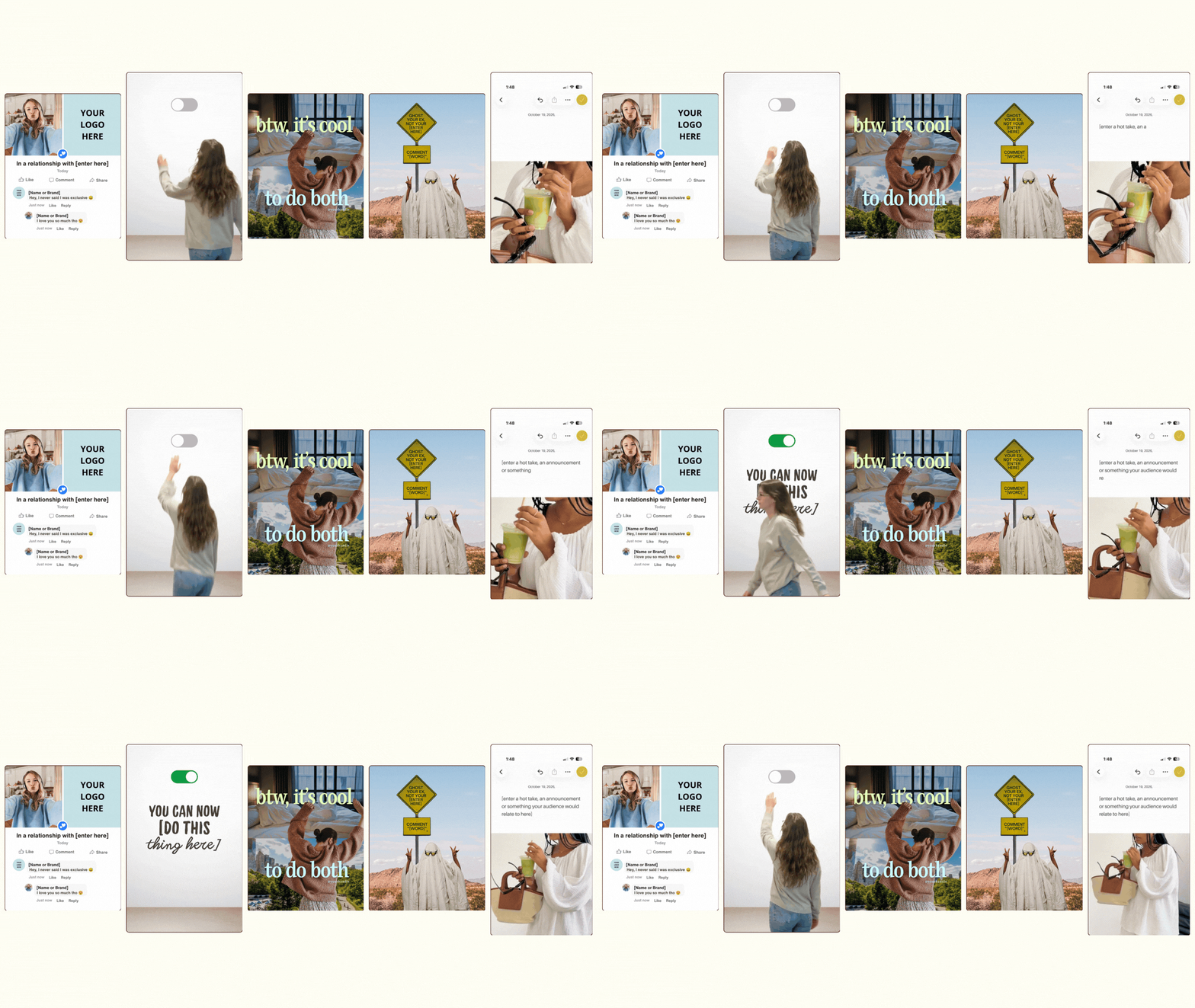

Photo: KVC Photography
About Manu Muraro
Manu Muraro is the founder of Your Social Team, a content marketing brand helping small business owners grow through strategic email marketing and Instagram content.
She’s the creator of Your Template Club, one of the first Canva template subscriptions designed for Instagram, and the founder of Your Inbox Team, a weekly email marketing membership that helps entrepreneurs send consistent, high-converting emails in under 15 minutes.
Manu is also the creator of The Reelies Awards, the first award show celebrating Small Business Owners and Creators’ creativity and originality in Instagram Reels.
A former creative strategist at Cartoon Network, Manu brings award-winning experience to everything she creates — from viral Reels to done-for-you content that saves time and drives results.
👉 Follow Manu at Your Social Team on Instagram